POST

Posted by

POST-SUMMARY-HERE

POST-TITLE-HERE

Posted by Author On Month - Day - Year

POST-SUMMARY-HERE

POST-TITLE-HERE

Posted by Author On Month - Day - Year

POST-SUMMARY-HERE

POST-TITLE-HERE

Posted by Author On Month - Day - Year

POST-SUMMARY-HERE

POST-TITLE-HERE

Posted by Author On Month - Day - Year

POST-SUMMARY-HERE

Showing posts with label Computer. Show all posts

HOW TO BACKUP YOUR COMPUTER SETTINGS

Posted by emsquared On 8:55 pm 0 comments
...and it was nothing to do with me, honest guv.
I believe you. No, really. It just happens. One of those death, taxes & my Windows PC is all messed up things. Now many people will try to sell or recommend so-called "registry cleaner" softwares designed to sort out the mess that your windows registry has no doubt become. That's all fine & dandy BUT for my twopeneth worth, the registry is just too complex a beastie for a piece of software to sort it out without guidance from someone who has a degree of knowledge concerning the windows registry. For the lay-person I would stay clear, these progs are a recipe for disaster. A much more effective course of action is to backup all your files & settings & just reinstall windows from scratch AND THEN put in place some measures to help keep your system in it's nice new pristine state (oh yeah, I hear you cry, ezi bleedin' peazy). All too often these days I see people just write off their "registry-mangled" PC as the result of "not being the latest processor) & just buying a new PC. Which is great until the same thing happens all over again. If you've got money to burn, fine, get your coat. if, on the other hand you'd rather spend your precious cash-money on other things (food, clothes, chocolate, a night out, botox, plastic surgery or whatever) then have a look-see & help yourself. I'm at the other end of an email, instant message or phone, should you need personal help too.
So, your Pee cee is just treacle city, slower than it was when new, slow to start-up, as sluggish as a slug at a "who's the laziest slug" contest. Before we can use our beige boxen for fun & meaningful stuff, we need to start with a clean sheet.
So...
  • Use file, settings & transfer wizard to backup all your files & settings
  • Use this guide
  • save this file onto a secondary or external drive or DVD
  • Reinstall your copy of windows XP (ideally allow it to format your hard drive)
  • When installed, use Windows update to patch your compy with the appropriate security patches.
  • install a good anti-virus prog
  • install an up to date web browser
  • use file setting, transfer to reinstall your
  • Use sytem restore to make a backup of your nice fresh faced, lean & mean installation of XP (as mentioned previuosly)

WHAT HAPPENS IF I MESS UP MY COMPUTER?

Posted by emsquared On 1:42 pm 0 comments
I always think it's best to learn from our mistakes BUT I get a
fuzzier, warmer feeling knowing that I can reset everything even if I
stuff up. Call it an
insurance policy to guard against moments when I fail to use joined up
thinking, when I'm tired, not paying attention or suffering from severe
chocolate deficiency (don't, don't).
What we (who's this "we"
I hear
you
ask, ok YOU then
) can do is save how your computer is at
this point in time & make it so we can get back there easily
if, like me, you stuff things up gloriously (the only way to
stuff things up in my opinion).So next, for all you Windows XP owners,
is a step by step guide to making your own insurance policy for your
compy.
INGREDIENTS FOR MAKING A "JUST IN CASE I MESS EVERYTHING UP
GLORIOUSLY" INSURANCE P
OLICY
TYPE SETTING (Concise eh!)


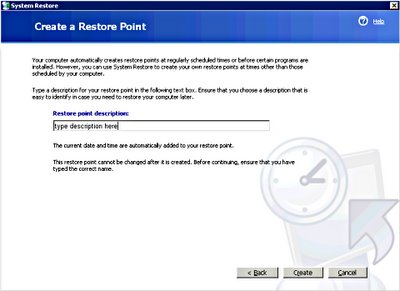
  • Go to START on your computer desktop

  • PROGRAMS - ACCESSORIES - SYSTEM TOOLS - SYSTEM RESTORE


  • Choose MAKE A RESTORE POINT


  • Give your restore point a suitably descriptive name


  • Choose CREATE & close when you have done
NOW you have a place to get back to should your compy try to mess up on you.
If you'd like to see this as a flash tutorial (Flash plugin browser required) then look here.

HOW DO I HAVE A HAPPY COMPUTER LIFE?

Posted by emsquared On 1:19 pm 0 comments
Make yourself a cup of tea (or whatever is your beverage of choice) & we'll cover some basics...
What you will need:
  • A working computer (PC or Mac), desktop or laptop
  • An easy to view computer screen
  • a comfortable chair
  • An internet connection